Unit System
In order to apply changes, the Maintenance Mode with system changes needs to be activated.
Further Information see Performing Maintenance Operations
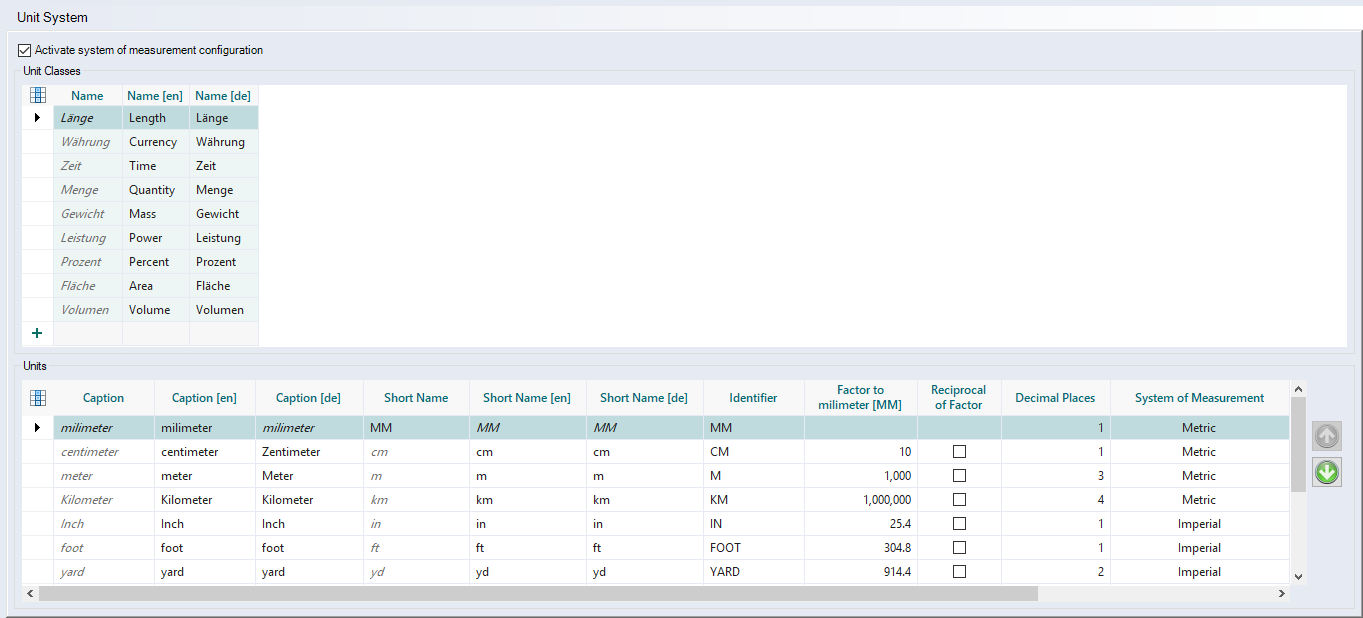
Here, the unit classes and units are configured.
-
"Activate system of measurement configuration" checkbox
In addition to the unspecific unit system you can configure and use the imperial and metric unit system. The checkbox is deactivated by default. All units and unit classes are unspecific.
"Unit Classes" table
| Column | Description |
|---|---|
|
Name [de / en] |
Name of the unit class (dimension). Only user-specific unit classes can be renamed (not standard ones). Further Information
|
"Units" table
| Column | Description | ||||||||
|---|---|---|---|---|---|---|---|---|---|
|
Name [de / en] |
Enter the name of the unit of measurement. This represents the full name of the unit. Further Information
|
||||||||
| Short label | Abbreviation or short name of the unit used, inter alia, when switching a unit. Standard abbreviations of units should be used here, e.g. "cm" for centimeter. | ||||||||
| DIN identifier | Unit identifier. It is possible to enter several identifiers for a unit, e.g. "h" and "hr" for the unit "hour". Enter identifiers separated by a semicolon ";". This enables the Excel import and Service-API to work with different identifiers for the same unit. When entering a new identifier, a check is run whether the identifier is already being used for a different unit. | ||||||||
| Factor to |
Value which is multiplied with the basic unit value of the dimension. Example
|
||||||||
| Reciprocal of Factor |
Value which the basic unit value of the dimension is divided by. Example
|
||||||||
| Decimal Places | Enter the number of digits after the decimal point for the value of the unit of measurement. Every user can modify the accuracy of a unit. | ||||||||
| System of Measurement | Assigning the unit to a unit system. A new unit has the unit system "unspecific" by default. | ||||||||
| Assignment Metric | A metric unit can be assigned to an imperial unit. When switching the unit system, the unit is automatically converted into and displayed in the assigned unit. | ||||||||
| Assignment Imperial | A metric unit can be assigned to an imperial unit. When switching the unit system, the unit is automatically converted into and displayed in the assigned unit. | ||||||||
|
Button
|
Sort units |
 and
and 
- Configure Units (system settings)
- User settings, Unit System