Calculate High Pressure Die Casting
You can use the Calculate High Pressure Die Casting cost model to calculate the process times and costs for the die casting manufacturing process in metalworking. In FACTON, there are value rule tables and formulas defined at the cost model providing you with information on:
- the anticipated cycle time,
- the possible process output per time and cycle,
- the material consumption, and
- the clamping force and the machine shot mass, and
- the primary and secondary processing times.
In the cost model High Pressure Die Casting a distinction is made between hot and cold chamber processes.
The table shows typical application scenarios of the cost model for parts and industries:
| Typical parts | Typical Industries |
|---|---|
|
|
You need specific knowledge about the manufacturing method in order to use the cost model.
- High Pressure Die Casting
-
At Process
- Details view > General Properties
 view scheme (combobox)
- Manufacturing Method > Primary Shaping > Casting > Die Casting
- Details view > General Properties
In the FACTON client, you can set the corresponding manufacturing method here:
Sequence
The following example illustrates the process and structure of the cost model:
The black triangle ◣ helps you identify editable values.
The Consistency Rule Violation check is available to you when entering values. The consistency rule violations check notifies when there are missing values and verifies the accuracy of the values entered.
When you hover over one of the Consistency rule violations icons with your mouse, a tooltip appears with the specific reason for the consistency rule violations.
Step 2: Insert Process
Insert process and set cost model 
-
In the Structure view, select the calculation element (e.g. should cost calculation) under which you wish to insert the process.
-
In the ribbon, click on Edit > Insert >
Process.A process is inserted in the calculation structure.
-
In the Details view > Calculation
 view scheme (combobox), select the following manufacturing valuation.
Name Value Manufacturing Valuation Calculate High Pressure Die Casting
The property Manufacturing Valuation becomes a property group with sub-groups.
The label of the process automatically changes to "
Step 3: Select Material
Based on the material classification, a selection list of compatible materials is available in the Details view > Calculation view scheme (combobox) under Manufacturing Valuation > Material Selection. The respective material will later be added to the structure.
You can use the following
| Material Classification | Die Casting Technique |
|---|---|
| Aluminum |
Cold Chamber Die Casting is automatically set |
| Magnesium Alloy | |
| Zinc |
Hot Chamber Die Casting is automatically set |
| Tin |
Select Material Classification and Material
-
Select the material classification for the process in the Details view > Calculation
view scheme (combobox): -
Select an available material in the Material Selection, e.g. "
| Name | Value |
|---|---|
| Material Classification* |
Basic Material > Metal > Nonferrous Metal > Light Metal > Aluminum |
| * FACTON recommends compatible materials based on the material classification. | |
Based on the selected material classification you can choose a material in the material selection. Accordingly, the following property values are determined via value rules:
- Specific Die Casting Pressure
- Thermal Conductivity
- Specific Heat Capacity
The properties are shown at the process in the Details view > Calculation view scheme (combobox) under Manufacturing Valuation > Material.
The following property values are defined by the material:
- Density
- Tensile Strength
Step 3: Describe Part
The part properties are required in order to determine the cycle time.
Describe
-
In the Structure view, select the
process " -
Enter the following values in the Details view > Calculation
view scheme (combobox):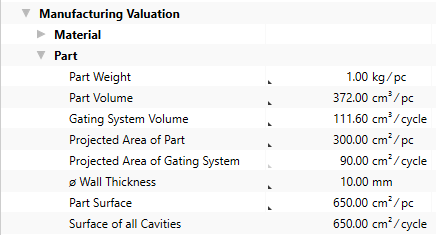
Based on these inputs, additional values are calculated and shown at the process in the Details view > Calculation
view scheme (combobox) under Manufacturing Valuation.
Step 5: Select Machine and Define Times
In der Details view > Calculation view scheme (combobox) unter Fertigungsmodus > Maschine ist bereits die erste Maschine aus der Auswahlliste vorselektiert. You can select the preferred machine. A suitable machine is determined from the master data based on the following calculated values:
-
Required Total Clamping Force
-
to be found under Manufacturing Valuation > Clamping Force
-
-
Material Usage Weight
-
to be found under Manufacturing Valuation > Material
-
Select Machines and Define Times
-
Select the machines for the process in the Details view > Calculation
view scheme (combobox):Machine Machine Selection Cold chamber die-casting machine (Mg; Al) | clamp force: 4,200.00 kN | Shot mass: 1.30 - 3.80 kg
Furnace Selection Medium frequency induction heater | Melting power: < 950.00 kg/h -
Enter values for the primary and secondary processing times:
Primary Processing Time Additional Primary Processing Time 2 s / cycle
Secondary Processing Times Insertion and Demolding Time 5 s / cycle Additional Secondary Processing Time 1 s / cycle
Based on the defined details, the cycle time is calculated.
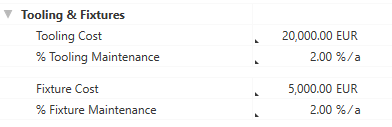
Step 6: Define Tools and Fixtures
In addition to the machine, you can also maintain values for
Define Details for
- Enter the following values in the Details view > Calculation view scheme (combobox) under Manufacturing Valuation >
Step 7: Complete Structure
Based on your entries, the BOM structure of the cost model is being automatically created via the "Complete Structure" function.
Complete structure of cost model
- In the Structure view select the process
- Right-click > Complete Structure.
- the selected material
- the selected machine
- a worker
- tools and fixtures
Alternative: F11 in the Structure view or Details view.
The structure is automatically generated based on your entries, and costs are being calculated.
Further changes are not applied immediately.
Perform the "Complete Structure" action again after every change to update your cost model.
All previously selected resources are inserted under the process
Calculated Values of the Cost Model
The following values are calculated using the data entered and then shown in the Details > Calculation view scheme:
- Cycle Time
- Cycles per Time
- Output per Cycle
- Output per Time
- Time per Unit Output
- Absolute Frequency of Occurrence
- Percentaged Frequency of Occurrence
Properties of the Die Casting cost model (Calculation > Manufacturing Valuation)
Material Classification
Selection of the material classification as basis for selecting the material. Usually the selection is made in the General Properties view schema and will then be assumed to the "Material" group in the Calculation view schema.
Under Details > General Properties:
|
|
|
 Selection from list directly possible.
Under Details > Calculation:
 Indirect input is possible using F12.
Material Selection
Selection of the material.
|
|
|
Die Casting Method
Automatic classification into hot and cold chamber processes based on the material classification.
| Material Classification | Die Casting Method |
|---|---|
| Aluminum |
Cold Chamber Die Casting is automatically set |
| Magnesium Alloy | |
| Zinc |
Hot Chamber Die Casting is automatically set |
| Tin |
Depends on: Material Classification
Indirect input is possible using F12.
Material Group
The material properties used to calculate the cost model are shown in this group.
Density
Density of the material.
 This value is required.
This value can be managed at the material (Details > Technical Data view scheme), or is applied when global templates are inserted.
Specific Die Casting Pressure
Specific die casting pressure required per area for a given material.
Depends on: Material Classification
Thermal Conductivity
Thermal conductivity of the material.
Depends on: Material Classification
Indirect input is possible using F12.
Specific Heat Capacity
Specific heat capacity that is required for a particular material per area.
Depends on: Material Classification
|
|
|
% Material Loss
Percentaged additional value on material usage weight for material loss which gets lost during the process and cannot be recycled.
 Direct input is possible.
Material Usage Volume
Required material weight including gating system volume.
Is calculated from:
- Part Volume
- Cavity Count
- Gating System Volume
Recyclable Material
Material mass of the gating system which can be recycled.
Is calculated from:
- Density
- Gating System Volume
Material Loss
Process-related and non-recyclable material loss.
Is calculated from:
- Material Usage Weight
- % Additional Value for Material Loss
Material Usage Weight
Required material weight including gating system weight.
Is calculated from:
- Density
- Material Usage Volume
Manufacturing Part group
The part properties used to calculate the cost model are shown in this group.
Part Weight
Weight of the part. Is calculated when entering a value for the "Part Volume".
Direct input is possible.
Part Volume
Volume of the part. Is calculated when entering a value for the "Part Weight".
Is calculated from:
- Density
- Part Weight
Indirect input is possible using F12.
Gating System Volume
Volume of the gating system.
|
|
|
Projected Area of Part
The area of the part projected in the mold parting surface.
|
|
|
Projected Area of Gating System
The area of the gating system projected in the mold parting surface. Is calculated when entering a value for the "Projected Area" of the part.
Is calculated from:
- Ratio of area to volume (cm²/cm³)
- Gating System Volume
Indirect input is possible using F12.
Wall Thickness
Average wall thickness of the part.
|
|
|
Surface Area per Part
Surface of the part.
|
|
|
Surface of all Cavities
Surface of all cavities in the tool.
Direct input is possible.
Sliders Necessary
Choose whether an additional slider is necessary. By activating this option, you can enter a value for "% Additional Clamping Force for Sliders".
 Activating/deactivating directly possible via a checkbox.
Clamping Force Group
The clamping force properties used to calculate the cost model are shown in this group.
Clamping Force by Projected Area of Part
Clamping force by projected area of part in the mold parting surface.
Is calculated from:
- Specific Die Casting Pressure
- Projected Area of Part
% Additional Clamping Force for Safety
Percentaged additional clamping force for safety ratio by projected area. Is calculated when entering a value for the "Additional Clamping Force for Safety".
Direct input is possible.
Additional Clamping Force for Safety
Absolute additional clamping force for safety ratio by projected area. Is calculated when entering a value for the "% Additional Clamping Force for Safety".
Direct input is possible.
% Additional Clamping Force for Sliders
Percentaged additional clamping force for sliders by projected area.
Precondition: Sliders Necessary
Direct input is possible.
Additional Clamping Force for Sliders Ratio
Absolute additional clamping force for sliders by projected area. Is calculated when entering a value for the "% Additional Clamping Force for Sliders".
Direct input is possible.
Required Clamping Force for Part
Required clamping force for the part with additional clamping forces.
Is calculated from:
- Clamping Force by Projected Area of Part
- Additional Clamping Force for Safety
- Additional Clamping Force for Sliders Ratio
Clamping Force by Projected Area of Gating System
Clamping force by projected area of the gating system in the mold parting surface.
Is calculated from:
- Specific Die Casting Pressure
- Projected Area of Gating System
Required Total Clamping Force
Required total clamping force for all cavities and the gating system.
Is calculated from:
- Required Clamping Force for Part
- Cavity Count
- Clamping Force by Projected Area of Gating System
Machine Group
The machine properties used to calculate the cost model are shown in this group.
Machine Selection
Select a machine. Based on the following values, a suitable selection list of master data machines is offered and the first is pre-selected.
Depends on:
- Die Casting Method
- is compared with the machine type
- Required Total Clamping Force
- is compared with the machine clamping force
- Material Usage Weight
- is compared with the machine shot mass
|
|
|
Furnace Selection
Select a machine. Based on the following values, a suitable selection list of master data machines is offered and the first is pre-selected.
Depends on:
- Material Usage Weight
- is compared with the machine performance (mass)
|
|
|
Clamping Force of the Machine
Maximum clamping force of the machine that is available.
This value is required.
This value is required and can be managed at the machine (Details > Technical Data view scheme), or is applied when global templates are inserted.
Shot Mass of the Machine
Maximum shot mass of the machine that is available.
This value is required.
This value is required and can be managed at the machine (Details > Technical Data view scheme), or is applied when global templates are inserted.
Possible Cavity Count by Clamping Force
The possible count of cavities determined with respect to the available clamping force.
Is calculated from:
- Clamping Force of the Machine
- Clamping Force by Projected Area of Gating System
- Required Clamping Force for Part
Possible Cavity Count by Shot Mass
The possible count of cavities determined with respect to the available shot mass.
Is calculated from:
- Density
- % Additional Value for Material Loss
- Part Volume
- Gating System Volume
- Shot Mass of the Machine
Cavity Count
Count of the actual cavities.
To calculate the cavity count, values for the following properties must be specified for the machine:
- Machine Type
- Available Clamping Force
- Shot Mass of the Machine
This value is required.
This value is required and can be managed at the machine (Details > Technical Data view scheme), or is applied when global templates are inserted.
Direct input is possible.
Primary Processing Times group
The primary processing times used to calculate the cost model are shown in this group.
Cooling Time
Time for cooling down the part for removal and further usage.
Is calculated from:
- Ø Wall Thickness
- Part Volume
- Projected Area of Part
In case of aluminum, there is also a factor for the cooling time. This factor depends on the average wall thickness. There is a value rule table for the aluminum cooling time coefficient in the master data under Global properties > Cost Model: High Pressure Die Casting > Aluminum Cooling Time Coefficient.
Tool Opening and Closing Time
Time for opening and closing the tool. There is a value rule table for the tooling time in the master data under Global properties > Cost Model: High Pressure Die Casting > Tool Opening and Closing Time.
Depends on:
-
Available Clamping Force
Indirect input is possible using F12.
Material Ladle Time
Time to ladle the material. There is a value rule table for the material ladle time in the master data under Global properties > Cost Model: High Pressure Die Casting > Material Ladle Time.
Depends on:
-
Material Usage
Indirect input is possible using F12.
Material Fill Time
Time to fill the tool.
Depends on:
-
Wall Thickness
Indirect input is possible using F12.
Additional Primary Processing Times
Possibility to add primary processing times that have not been considered.
Direct input is possible.
Primary Cycle Time
Time in which the actual activity of a process is performed.
Is calculated from:
- Cooling Time
- Tool Opening and Closing Time
- Material Ladle Time
- Material Fill Time
- Additional Primary Processing Times
Secondary Processing Times group
The secondary processing times used to calculate the cost model are shown in this group.
Insertion and Demolding Time
Time for inserting and demolding the part.
Direct input is possible.
Sliders Count
Number of sliders of the tool.
Direct input is possible.
Greasing Time
Time for greasing all cavities of the tool. There is a value rule table for the greasing time in the master data under Global properties > Cost Model: High Pressure Die Casting > Greasing Time.
Depends on:
-
Greasing Surface
Indirect input is possible using F12.
Additional Secondary Processing Times
Possibility to add secondary processing times that have not been considered.
Direct input is possible.
Secondary Cycle Time
Necessary idle time of a process in which its actual activity cannot be performed.
Is calculated from:
- Insertion and Demolding Time
- Greasing Time
- Additional Secondary Processing Times
Tooling & Fixtures group
In this group you can define the costs for tools and fixtures, as well as their annual maintenance costs.
Tooling Cost
Costs required for used tools.
Direct input is possible.
% Tooling Maintenance
Share of maintenance costs for tools per year.
Direct input is possible.
Fixture Cost
Costs required for used fixtures.
Direct input is possible.
% Fixture Maintenance
Share of maintenance costs for fixtures per year.
Direct input is possible.