Calculate Sheet
This quantity valuation offers you the material quantity calculation for sheets, so that this rather complex calculation needn't be calculated and documented outside FACTON.
The following example shows the detailed use of a material quantity calculation:
Step 1: Create Should Cost Calculation
Further Information > Create Should Cost Calculation
Step 2: Insert a Material (Mass)
By selecting the Calculate Sheet quantity valuation, a more extended calculation logic becomes available.
You can insert the  material
-
as master data via using queries
-
Insert your own material locally
or
The latter is shown in the following, because it illustrates the inputs required for calculation.
Insert a Local Material (Mass)
- Select the should cost calculation in the Structure view.
- In the ribbon, click on Edit > Insert > Insert New Local Material (Mass).
A local material is added under the should cost calculation.
-
In the Details view > Calculation
 view scheme (combobox), select the following quantity valuation:
-
Calculate Sheet
For materials with the quantity valuation Calculate Sheet, the following options for calculation methods and levels of detail are available:
-
Extend Material Calculation
The following checkboxes enable you to activate or deactivate further details of the material calculation.
Calculation Method
In the material quantity calculation for sheets, the following calculation methods are available to you:
Calculation Method "Feeds"
Inputs for sheet materials with the "Feeds" method &  Detailed Length Calculation
Define the following properties for the material in the Details view > Calculation view scheme (combobox):
| Valuation | *Calculate Costs |
| Quantity Valuation | Calculate Sheet |
| Detailed Quantity Calculation |
|
|
|
| Density | 7.85 g / cm³ |
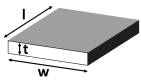
| Sheet Width (w) | 200.00 mm |
| Sheet Thickness (t) | 2.00 mm |
| Sheet Length (l) | 3,000.00 mm |
| Calculation Method | Feeds |
| Detailed Length Calculation |
|
 |
|
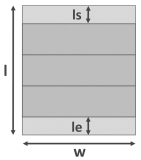
| Sheet Remaining Length Start (ls) | 50.00 mm |
| Sheet Remaining Length End (le) | 50.00 mm |
| Feed Length | 300.00 mm |
| Output per Feed | 2.00 |
| Price Source | Standard |
| Price per Unit |
 23.00 EUR / kg 23.00 EUR / kg |
| Refund per Unit |
15.00 EUR / kg |
Based on the input, the following values are calculated:
| Input | Calculates the |
|---|---|
|
Sheet Width (w) Sheet Thickness (t) |
|
| Sheet Length (l) |
|
|
Sheet Remaining Length Start (ls) Sheet Remaining Length End (le) |
|
| Feed Length |
|
| Output per Feed |
|
Calculation Method "Parts"
Inputs for sheet materials with the "Parts" method & Detailed Length Calculation
Define the following properties for the material in the Details view > Calculation view scheme (combobox):
| Valuation | *Calculate Costs |
| Quantity Valuation | Calculate Sheet |
|
|
|
| Density | 7.85 g / cm³ |
| Sheet Width (w) | 440.00 mm |
| Sheet Thickness (t) | 10.00 mm |
| Sheet Length (l) | 3,000.00 mm |
| Calculation Method | Parts |
| Detailed Length Calculation |

|
 |
|
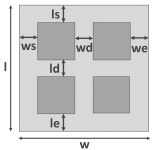
| Sheet Remaining Length Start (ls) | 30.00 mm |
| Sheet Remaining Length End (le) | 20.00 mm |
| Sheet Remaining Width Start (ws) | 10.00 mm |
| Sheet Remaining Width End (we) | 30.00 mm |
| Part Length | 75.00 mm |
| Part Width | 120.00 mm |
| Nesting Quantity | 2.00 |
| Distance between Parts (ld) | 2.00 mm |
| Distance between Parts (wd) | 2.00 mm |
| Price Source | Standard |
| Price per Unit |
23.00 EUR / kg |
| Refund per Unit |
15.00 EUR / kg |
Based on the input, the following values are calculated:
| Input | Calculates the |
|---|---|
| Sheet Width (w), Sheet Thickness (t) |
|
| Sheet Length (l) |
|
| Sheet Remaining Length Start (ls) |
|
| Sheet Remaining Length End (le) | |
| Sheet Remaining Width Start (ws) |
|
| Sheet Remaining Width End (we) | |
| Part Length, Part Width, Nesting Quantity |
|
Calculation Method "Material Utilization"
In addition to the calculation methods "Feeds" and "Parts", you can also choose "Material Utilization". Using this method, it can be defined how much material of the whole sheet is actually used (e. g. stamped out).
The Material Utilization value is the counterpart of the Markup Rate on Net Quantity: both values are calculated bidirectionally.
Input for Sheet-Materials using "Material Utilization"
| Valuation | *Calculate Costs |
| Quantity Valuation | Calculate Sheet |
| Detailed Quantity Calculation |
|
|
|
|
| Density | 7.85 g / cm³ |
| Sheet Length (l) | 3,000.00 mm |
| Sheet Width (w) | 440.00 mm |
| Sheet Thickness (t) | 10.00 mm |
| Calculation Method | Material Utilization |
| Total Number of Parts | 15.00 |
| Material Utilization | 88.00 % |
| Markup Rate on Net Quantity | 12.00 % |
| Price Source | Standard |
| Price per Unit |
23.00 EUR / kg |
| Refund per Unit |
15.00 EUR / kg |
Based on the input, the following values are calculated:
| Input | Calculates the |
|---|---|
|
Sheet Width (w) Sheet Thickness (t) |
|
| Sheet Length (l) |
|
| Total Number of Parts |
|
| Material Utilization |
|
| Markup Rate on Net Quantity |
|
After all inputs, the following costs are calculated and displayed as rounded figures in the Details view > Calculation view scheme (combobox):
Direct Material Cost incl. Inbound Logistics

An overview of the material costs can be found in the Details view > Cost Summary  view scheme (combobox).
Details view > Cost Summary view scheme (combobox) in the Details view
The cost summary offers an overview on the cost breakdown and composition of the relevant material costs.
| Direct Material Cost Raw Material | 13.75 EUR / pc |
| Inbound Logistics Cost | 2.20 EUR / pc |
| Direct Material Cost incl. Inbound Logistics | 15.95 EUR / pc |
| Material Overhead Cost | 0.63 EUR / pc |
| Material Refund | -2.25 EUR / pc |
| Material Cost | 14.33 EUR / pc |