Insert Material
The material "20MnCr5" from the global templates (especially the FACTON Benchmark content) shall be inserted to the part (piece) "Motor Shaft".
These calculation elements are also referred to as 'global' since they are linked to the master data. This link is referred to as a reference. You can identify references by the red arrow:  .
.
This enables you to quickly set up a calculation structure and reuse data.
-
Select the *Aggregate Costs valuation for the
 part in the Details > Calculation view schema (combobox).
You can insert calculation elements to build a calculation structure.
-
Insert the
 material "20MnCr5" from the FACTON Benchmark Content under the part "Motor Shaft".
- In the Details view > General Properties
 view scheme (combobox), enter values for the following properties:
Calculation Quantity Valuation Calculate Solid Profile Geometric Shape Round 
Diameter (w) 18 mm Profile Length (l) 3,000 mm Length of Finished Material 70.66 mm Consider Length Allowance 
Length Allowance 2 mm Detailed Length Calculation 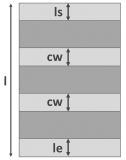
Cutting Width (cw) 3 mm Profile Remaining Length Start (ls) 100 mm Profile Remaining Length End (le) 50 mm
FACTON uses this information to calculate the required gross quantity of material.
 Next step: Insert Processes