Insert Processes
Processes that are required for manufacturing continue to be added to the part (piece) “Motor Shaft”. Related processes can be structured using the grouping. The grouping itself has no function in product costing.
The units are pre-configured in FACTON. If you want to enter a value in a different unit, you can toggle through different units using the selection list.
Further Information > Toggle Unit*
Sequence
Insert Grouping "Turning"
-
In the Structure view, select
 "Motor Shaft".
 -
In the ribbon, click on Edit > Insert >
 Grouping (Piece) to insert a grouping.
 -
Change the label to "Turning".
Insert Setup Process and Process "Turning"
-
In the ribbon, click on Edit > Insert >
 Setup Process to insert a setup process.
 - In the Details view > General Properties
 view scheme (combobox), enter values for the following properties:
Name Setup Process - Turning Setup time 8 h/lot -
In the Structure view, select the grouping
"Turning". -
In the ribbon, click on Edit > Insert >
 Process to insert a process.
 - In the Details view > General Properties view scheme (combobox), enter values for the following properties:
Name Process – Turning Cycle Time 1.2 min/cycle*
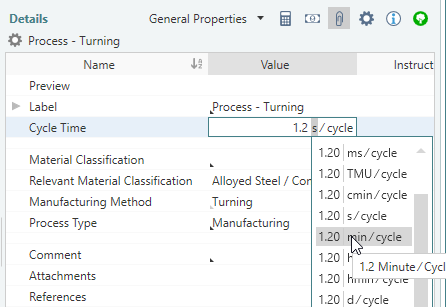
If you do not have knowledge of the cycle time for processes, FACTON provides you with cost models for calculating the cycle times.
Further Information > Cost Models
Insert Process "Washing"
-
In the Structure view, select
"Motor Shaft". -
In the ribbon, click on Edit > Insert >
Process to insert a process. - In the Details view > General Properties view scheme (combobox), enter values for the following properties:
Name Washing Cycle Time 700 s/cycle Manufacturing Method  Separating > Cleaning > Fluidic Cleaning
Calculation Yield per cycle 100 pc/cycle
Insert Process "Hardening"
-
In the Structure view, select
"Motor Shaft". -
In the ribbon, click on Edit > Insert >
Process to insert a process. - In the Details view > General Properties view scheme (combobox), enter values for the following properties:
Name Hardening Cycle Time 21.6 s/cycle Calculation Yield per cycle 3 pc/cycle
Insert Grouping "Grinding"
-
In the Structure view, select
"Motor Shaft". -
In the ribbon, click on Edit > Insert >
Grouping (Piece) to insert a grouping. -
Change the label to "Grinding".
Insert Setup Process and Process "Grinding"
-
In the ribbon, click on Edit > Insert >
Setup Process to insert a setup process. - In the Details view > General Properties view scheme (combobox), enter values for the following properties:
Name Setup Process – Grinding Setup time 8 h / lot Manufacturing Method Separating > Chipping with Geometrically Determined Cutting Edge (DIN 8589-0) > Turning (DIN 8589-11) -
In the Structure view, select the grouping
"Grinding". -
In the ribbon, click on Edit > Insert >
Process to insert a process. - In the Details view > General Properties view scheme (combobox), enter values for the following properties:
Name Process – Grinding Cycle Time 0.8 min/cycle*
Insert Process "Washing & Preserve"
-
In the Structure view, select
"Motor Shaft". -
Insert a
Process with the label "Washing & Preserve". - In the Details view > General Properties view scheme (combobox), enter values for the following properties:
Cycle Time 700 s/cycle Calculation Yield per cycle 100 pc/cycle
Insert Process "Remaining Dirt"
-
In the Structure view, select
"Motor Shaft". -
Insert a
Process with the label "Remaining Dirt". - In the Details view > General Properties view scheme (combobox), enter values for the following properties:
Cycle Time 30 min/cycle Calculation Yield per cycle 10,000 pc/cycle
Insert Process "Packaging & Goods Leaving Inspection"
-
In the Structure view, select
"Motor Shaft". -
Insert a
Process with the label "Packaging & Goods Leaving Inspection". - In the Details view > General Properties view scheme (combobox), enter values for the following properties:
Cycle Time 10 s / cycle Manufacturing Method General Processes > Packaging
 Result of this section: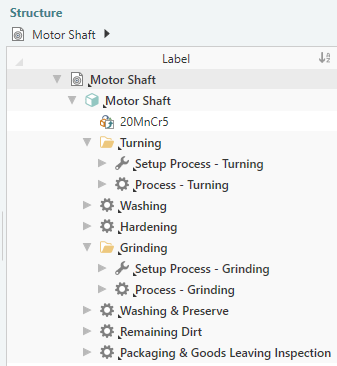
 Next step: Specify Processes